Licence and Account
Connect your stores to your account, keep Pro updated and renewed, and know what happens when the paid period ends.
On this page
Free needs no account, key or connection to Plugins Atelier. This page is about Pro, from version 1.0.0.
What your account is for
Licence, activations, renewal and purchase are managed in your Plugins Atelier account, without waiting for support.
Pro asks for no licence key, and every Pro feature works without a connection. What a connected store gets from your account is its services: updates and support.
Activations
Each Pro installation connects to your Account with its own activation. One takes the production slot, your store’s; the others, up to two, are non-production installations and do not count as another store.
To connect an installation, request a connection key in your Plugins Atelier account, under
Connect an installation, and paste it in Visual Reviews > Settings, in the Platform
services card. The key starts with atb_, and it works once and for 10 minutes.
The state of the connection
In Pro, Platform services is the first card of Visual Reviews > Settings. It shows one of these states:
- Not connected: the store is not connected to an account. Every feature of Visual Reviews Pro works without a connection.
- Services active: the store is connected and its paid service period is active. There is nothing to do.
- Security updates only: the paid service period has ended or is restricted. The store still receives security updates. Renew in your account to recover every service.
- Not confirmed: the answer to a connection did not arrive. Select Retry connection. The same key can be retried for 10 minutes from the first attempt.
- Reconnection needed or Connection not accepted: the store has no connection the platform
accepts. The connection could not be completed, it was disconnected in your account, or the site’s
secret keys in
wp-config.phpchanged. Follow Reconnect the store. - Rotation not confirmed: the answer to a rotation did not arrive, and the store keeps its current credential. Select Retry rotation.
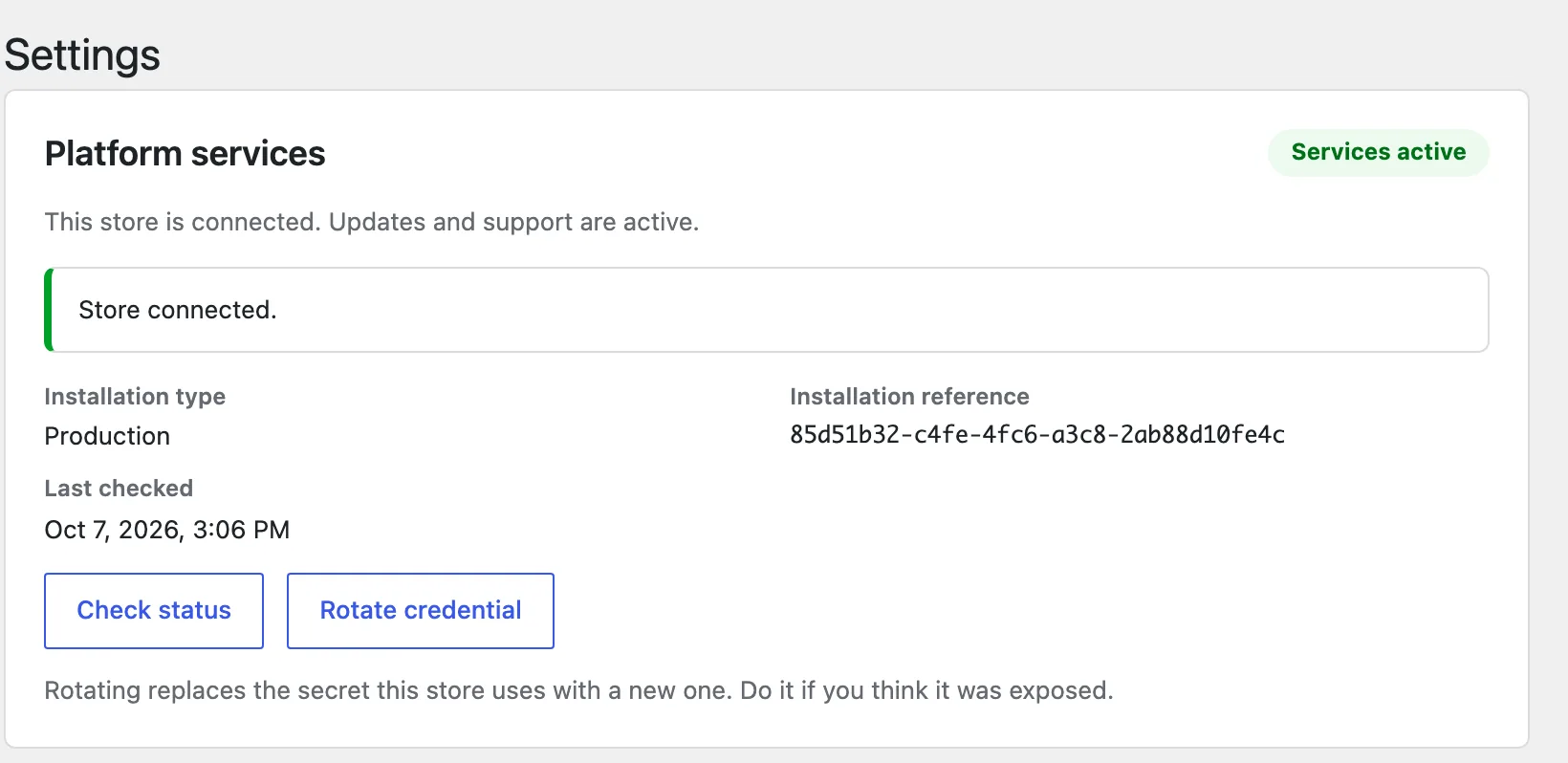
Rotate credential replaces the secret the store uses to identify itself with a new one. It is never automatic: use it if you think the secret was exposed, for example in a copy of the database.
Reconnect the store
Before you start:
- The Platform services card says Reconnection needed or Connection not accepted.
- In your Plugins Atelier account, disconnect the installation whose reference matches the Installation reference of the card, if it is listed.
- Under Connect an installation, request a new connection key.
- In Visual Reviews > Settings, paste it in Connection key.
- Select Connect.
The screen confirms with “Store connected.” and the card says Services active. The store keeps the same reference.
Updates
A connected Pro updates from the WordPress updater, in Dashboard > Updates and in Plugins, like your other plugins. WordPress offers it only the releases Plugins Atelier publishes for your store and, before installing one, the store checks its signature and that the download is complete.
Automatic updates stay as WordPress has them: off until you turn them on for this plugin. A Pro that is not connected is offered no updates.
Free updates from WordPress.org, like any plugin installed from there.
Renewal and cancellation
The renewal is charged automatically every year, at the same price. If a charge fails, the services end when the paid period ends, with no grace days, and return once the payment is confirmed, without extending the period for the time without service.
You can cancel the renewal at any time from your Account or from Link. Cancelling stops future charges, not the paid period: you keep every service until it ends.
The Pro service terms say who takes the payment and give the full conditions, and Guarantee and refunds covers the 30-day guarantee.
When the services end
If the paid period ends without a renewal, the services end: ordinary downloads and updates, included support, and connecting, transferring or replacing installations.
The installed Pro keeps working as before. We do not deactivate it, turn it into Free or touch your store: the platform does not contact it when the period ends.
If we publish a security release for your plugin, you can download it even after the period has ended, with no time limit. We do not promise to always publish fixes or to maintain old versions.
Your Account and your history remain available. If you renew later, from your Account, the services return on the same entitlement and the same installations, without reinstalling or reconnecting. The new period starts with the payment, and the time without service is not charged.
On a connected store, the Platform services card then shows Security updates only.
Move the service to another installation
To move the service to another installation, disconnect the old one from your Account: its slot becomes free for the new one. You can also transfer the production slot to a non-production installation that is already connected, which becomes the production one, and, if the production store is no longer available, replace it.
Disconnecting, transferring or replacing moves no data from your store and does not switch the plugin off: the old installation keeps its Pro but stops receiving downloads and updates.