Rewards
In Pro, send a coupon to customers whose review with a photo or a video you approve, with the label shoppers see on it.
On this page
Review rewards are a Pro feature. Free has no rewards and no Discounts tab. Pro has them from version 1.0.0.
When you approve a review with a photo or video, Pro sends your customer a WooCommerce coupon for their next purchase. And the review carries the “Incentivized review” label in plain sight.
Turn it on
Before you start:
- Pro is your active Edition.
- You know the discount you want to give and how long the coupon should last.
- Go to Visual Reviews > Request reviews.
- Open the Discounts tab.
- Tick Turn on the review reward.
- Choose the Discount type.
- Enter the Discount.
- Set The coupon expires after.
- Select Save reward.
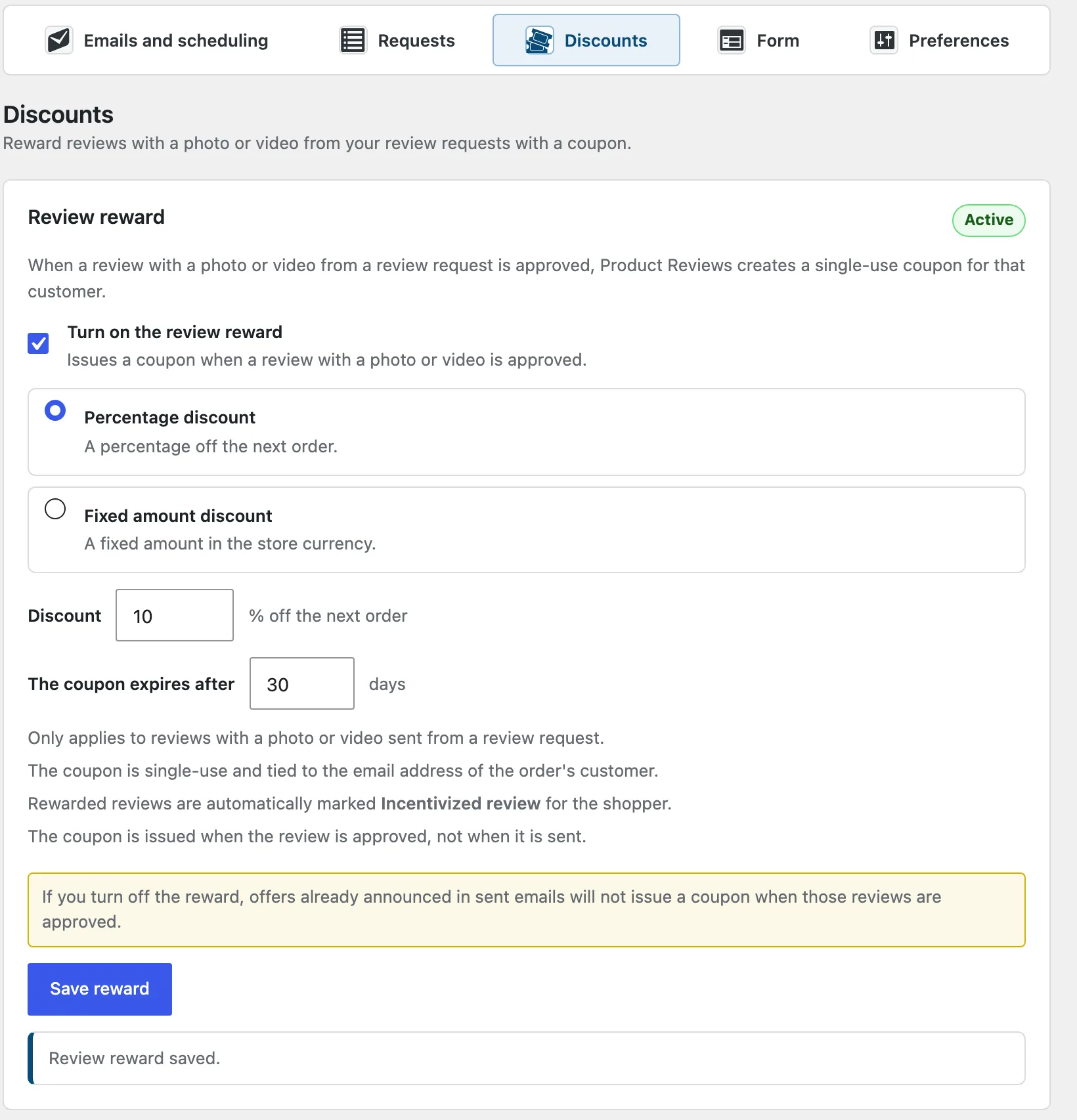
The screen confirms with “Review reward saved.” and the Review reward card says Active. The Settings reference gives the default and the values of each field.
Which reviews earn it
- The review comes from a review request, so there is an order behind it.
- It has at least one photo or a video.
- It is approved, by you or by your publishing policy. The coupon is issued when the review is approved, not when it is sent.
Reviews from a public review link, imported reviews and reviews with only text earn no coupon. The amount is the same for a photo and for a video.
There is at most one coupon for each order, even if the customer reviews several products with photos. Approving a review again does not issue another.
The coupon
It is a WooCommerce coupon created for that reward. It works once, only with the email address of
the order’s customer, and on the whole store. Its code starts with REVIEW-.
It has no minimum order and no restriction by product or category. You can see it and manage it in WooCommerce like any other coupon.
Important: If the review is later rejected or archived, the coupon stays valid: Visual Reviews does not withdraw it.
What the customer is told
The request email and the reminder announce the coupon and say it arrives once the review is approved.
Both emails say it with these words: “We will email your discount code once your review is approved.”
When the coupon is issued, the customer gets an email with the code, the discount and its expiry date.
The Incentivized review label
A review that earns a reward is marked as incentivized, and shoppers see the Incentivized review label on it wherever the review is shown. The settings say it with these words: “Rewarded reviews are automatically marked Incentivized review for the shopper.”
This is not a setting. If you do not want that label on your reviews, do not turn rewards on.
If you turn it off
Important: No coupon is issued while the reward is off, and the settings warn you: “If you turn off the reward, offers already announced in sent emails will not issue a coupon when those reviews are approved.”
Turning it on again issues nothing for the reviews approved in between.
If you switch to Free
You keep reviews, photos and settings. Free stops showing Pro’s gallery and shortcodes, and doesn’t issue coupons.
Your reward settings stay saved and are there again if you return to Pro, and the coupons already issued stay valid.